JOIN THE JOURNEY!
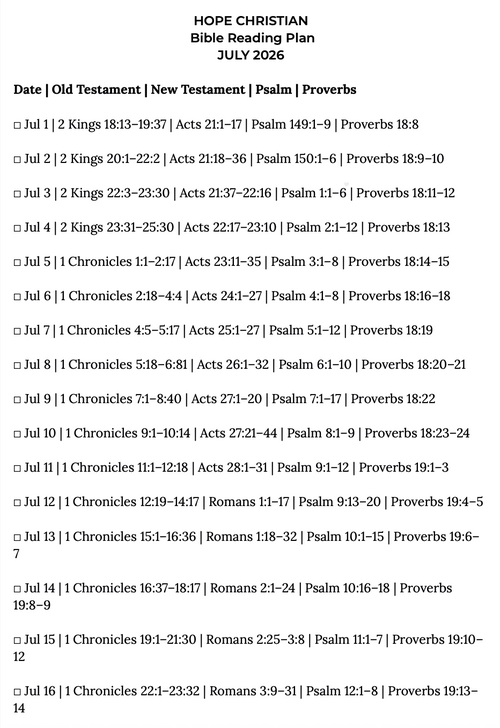
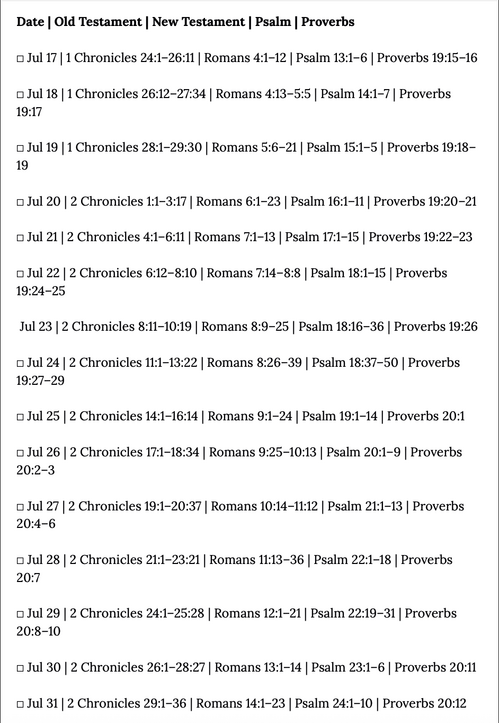
As a church we began a 1 year Bible reading plan! Starting in Romans (July 12th).
Join us in reading the Bible every day as we grow as apprentices of Jesus together!
There are several resources that you can utilize!
Physical, Audible, & other!
B.) USE A PHYSICAL PRINTOUT SCHEDULE
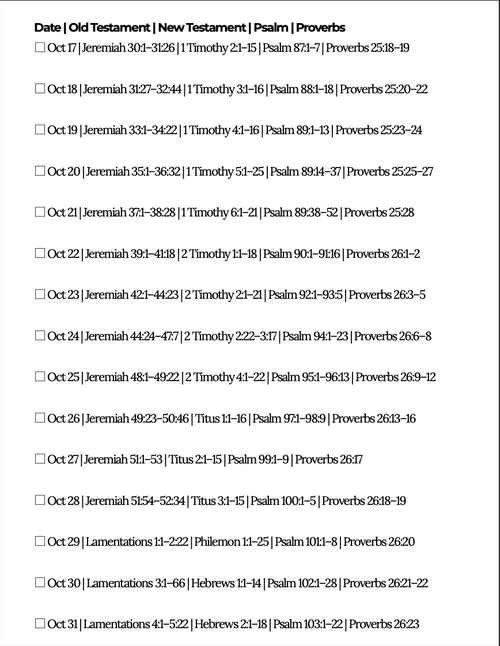
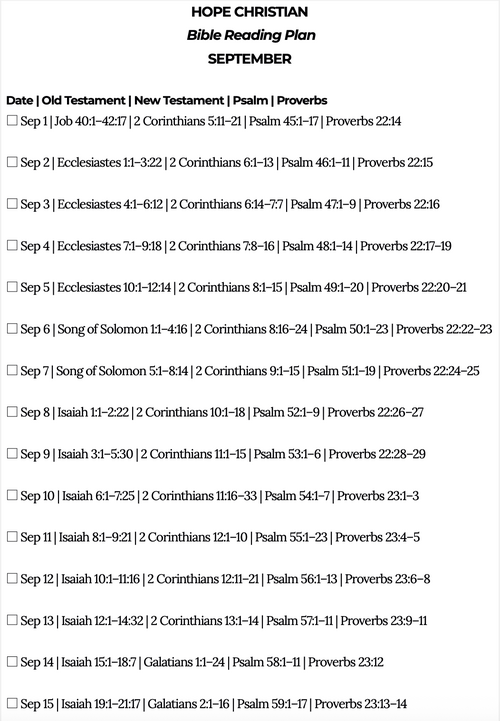
Read along using your own personal Bible by grabbing one of the printed Bible Reading Cards in the church lobby, or find them on these webpage uploads.
C.) AUDIO BIBLES or LISTEN VIA PODCASTS:
Listen to the daily scripture passages read audibly by subscribing to the '1 Year Daily Audio Bible Podcast by Brian Hardin' on Spotify, Apple Podcasts, Youtube or Audible.
This podcast also shares some additional historical context/commentary by Brian Hardin in addition to the reading of the text.
This podcast also shares some additional historical context/commentary by Brian Hardin in addition to the reading of the text.
D.) MOBILE APP: YouVersion Bible App
LINK: YouVersion BibleApp reading plan
Setup Instructions:
Setup Instructions:
- Select "Start Reading Plan",
- then "By Myself"
- and then "Private".
- then "By Myself"
Once added, you can reset the dates to the current day by following these steps below:
- Step 1- When you pull up the reading plan in the app, you'll see a box with the number "1" and the current date (Example July 12) with a list of readings from the Books of Genesis and Matthew below.
- Step 2- Ask Google/Siri how many days into the year the current date is. (Example: "How many days into the year is July 12th?" to which it will reply "193 days"
- Step 3- You'll then scroll right on the bar that has the boxes with sequential numbers and dates until you get to the number that is the one prior to the current date's "days into the year" (number 192 in our example if the current date is July 12th)
- Step 4- Click all the circles next to the scripture passages for day 192 until they all turn into check marks and it registers that day's reading completed. **Note: For Androids you have to check off all readings from the prior two days instead of one**
- Step 5- Lastly, click the 3 dots on the top right of the screen, then "Settings" on the drop down bar and then the black "shift dates forward" button. Once you do that the main screen of the bible reading plan should show you on "Day 193" with the scripture passages below including 1 Chronicles 12-14 and Romans 1. **Note: It's fine to reset this calendar to the current date prior to July 12th but just note that it will show different passages than Romans 1 until you get to July 12th
Here's the full year outline in 24pages of half-sheets:
1 chapter per day =
The WHOLE New Testament in a year!
~3.25 chapters per day =
The WHOLE Bible in a year!
One Year outline Resource:
Here's the full year outline in 24pages of half-sheets:
November 2026
uploads pending
October 2026
Downloadable half sheets:

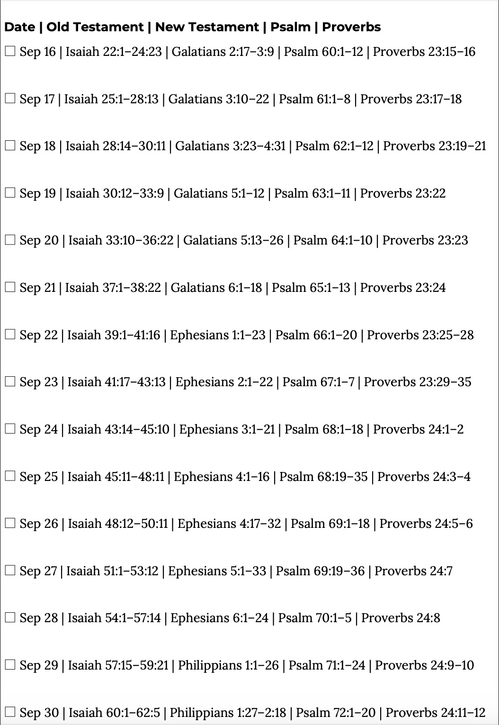
September 2026
Downloadable half sheets:
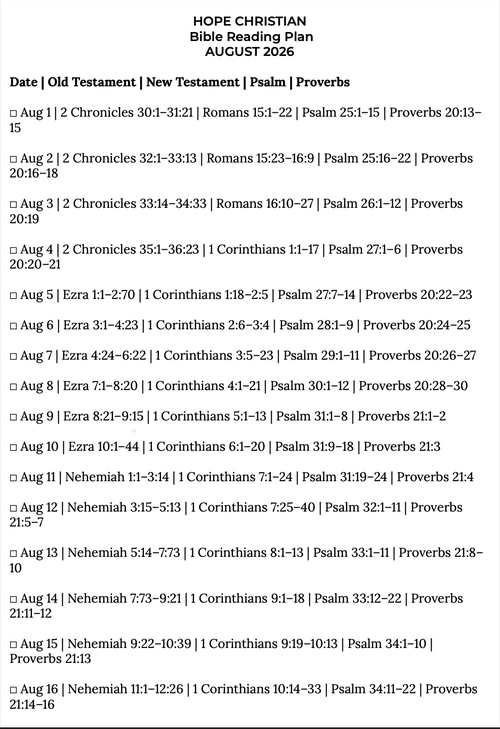
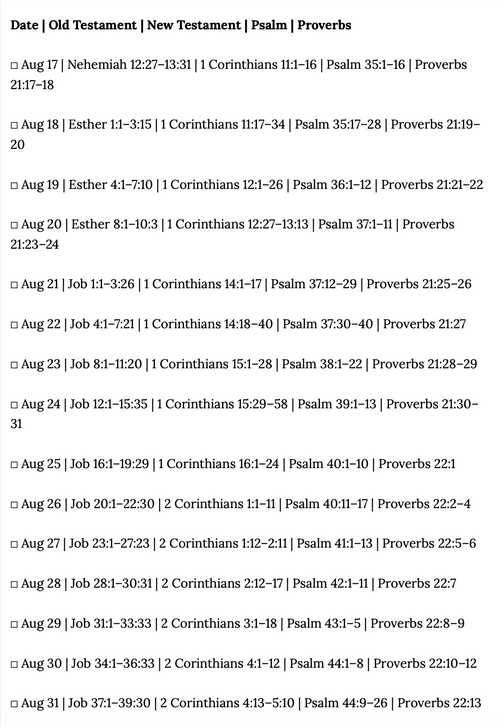
AUGUST 2026
JULY 2026